Education Suite

SimplyEduTech "online" Education Suite for Schools ["anywhere anytime access"]

SimplyEduTech "online" Education Suite for Schools is a digital education platform for schools comprising a Learning Management System, an extensive content library, and Single-Sign-On capability to Microsoft Office and Teams, Google Meet and Zoom, as well as other supporting software tools and 3rd party online services, forming a consolidated platform for digital transformation, adoption of e-learning and implementation of distance learning in education institutions, primary schools.

SimplyEduTech "online" includes once-off setup and training coupled with SLA for ongoing software maintenance / product updates and support including first-line support to the customer through local partners in South Africa.

image
image
image

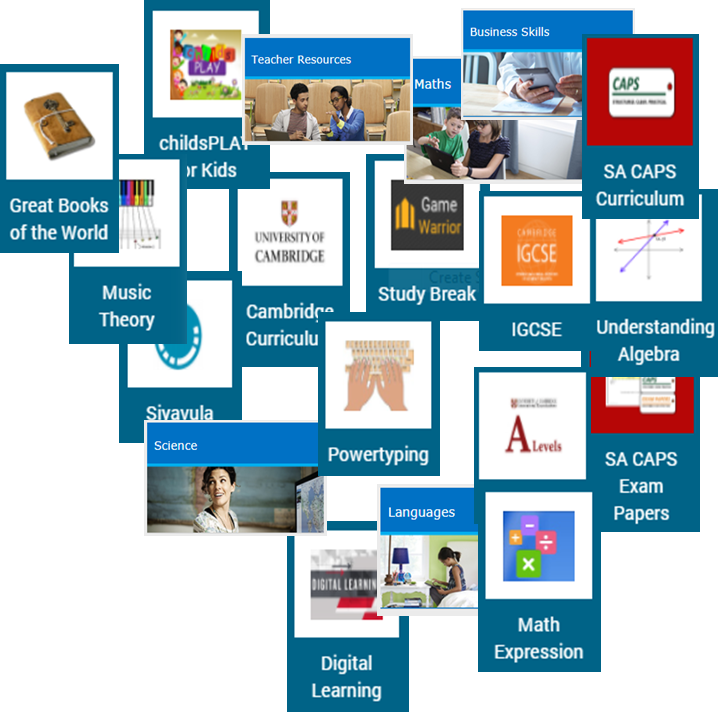
SimplyEduTech Launcher

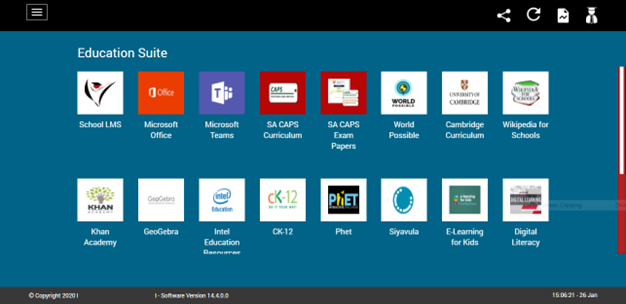
  • The Launcher Application is a component of the "online" Education Suite. The Launcher does not host any education content assets but operates as an online education portal.
  • It is a web application intended to be the entry-point of the "online" Education Suite and includes single-sign-on (SSO) support to use Microsoft or Google end-user institution/personal accounts for a more seamless user experience across the platform.
  • SimplyEduTech "online" Education Suite is a platform which includes an ever-increasing number of pre-integrated applications/services, including 3rd party applications/services, accessible through the Launcher web portal.
image

SimplyEduTech Learning Management System (LMS)

  • Simply defined, a learning management system (LMS) is a software used to administer learning and training of various courses to one or more learners. These days, an LMS is typically an online hosted system that allows the learners to authenticate themselves, register for the course, complete the course, and then take assessments for learning outcomes.
  • The SimplyEduTech LMS is a fully integrated customizable digital learning platform including mobile access capability (responsive user interface ensures usability in a web browser even on a mobile device) that allows students to learn anywhere, anytime, at their own convenience. This platform works across multiple devices including smartphones, tablets and laptops.
  • The SimplyEduTech LMS includes pre-existing integrations with various 3rd party platforms such as Zoom, Big Blue Button, Microsoft Office 365/Teams, etc. and also supports the possibility of new / custom integrations.
image
image
image
image

SimplyEduTech Digital Education Library

  • SimplyEduTech Digital Education Library (DEL) is a software component of the SimplyEduTech Education Suite. It is primarily an e-learning library suited to learners from early childhood through to graduation. The DEL contains a consolidated, curated aggregation of digital education content relevant to K12 schools and may be further enhanced with available curriculum-aligned content.
  • Curriculum-aligned and supporting e-learning content for any curriculum may be curated and/or aggregated for delivery and on- demand distribution/consumption through SimplyEduTech Digital Education Library.
  • SimplyEduTech SA has partnered with several publishers to deliver a comprehensive e-Learning content library including resources suitable for learning, catch-up, revision and teaching.
  • SimplyEduTech DEL offers a plethora of rich supporting digital education content and e-Research tools all accessible to the learner/teacher on any end-user device that supports a modern web browser.
image

Saas-based Managed Service

SimplyEduTech "online" is delivered as a managed service supported on custom-designed managed "core" infrastructure on domains forming part of the SimplyEduTech eco-system of education-centric products, services and solutions. It is accessible from anywhere with internet connectivity on any device supporting a modern web browser.

Managed infrastructure accounts for the following:

  • Designed for intensive ongoing concurrent use due to rapid adoption in education institution context.
  • Use online hosting infrastructure (accessible anywhere, scalable, high-availability, cost-effective).
  • Target minimum 1Mb/s peak per session shared server-side bandwidth.
  • Application and user data backup.

Effectively, Institutions need not manage IT infrastructure and institution IT personnel can instead focus on supporting staff/instructors and learners to adopt and actively use the various services.

POWERPNT_aTFYFnhiGT

SimplyEduTech "offline" Education Suite for Schools ["on-prem / in-school" access]

  • SimpyEduTech "offline" Education Suite for School is a "on-premises / in-school" Digital Education Platform for school, installed at a school to enable easy access to digital education content and other education resources and software tools over the school's local area network, supporting up to 2000 concurrent users, without any dependence on internet connectivity / data.
  • SimplyEduTech "offline" Education Suite is the basis of the "SimplyEduTech School" and consists of a stand-alone in-school SimplyEduTech School Education Hub or SimplyEduTech Portable Classroom Education Hub device, accessible over wired/wireless local area networks without dependence on internet connectivity, and with no DATA cost to teachers and learners.
  • Optional preferable minimal "thin-pipe" internet connection (strongly recommended to minimise site visits for technical maintenance / support) e.g. 3G dongle with minimal monthly data package, for remote monitoring, management, 2nd-line support, data collection for stats / analytics / insights and / or software updates.
  • Digital education content and software updates to the hub - can be trickled over internet connection [PSTN/ dial-up, ADSL, 3G, 4G LTE, VSAT (deep rural areas), etc.] OR with SimplyEduTech's own satellite digital content delivery add-on (subject to feasibility assessment, minimum: 500 sites)
  • Provides access to SImplyEduTech "offline" Education Suite over any wired or wireless local area network without dependence on internet connectivity/data to access digital education content.
  • Micro-server, suitable for permanent installation in secure location at the school. Includes all mandatory accessories (gigabit USB-Ethernet adapters, surge protector).
  • Supports up to 2000 concurrent users i.e. maximum typical school with a total network bandwidth capability of 4Gb/s depending on processor Intel Celeron/ i3 / i5 / i7 and DDR memory 4/8/16/32GB (recommended: gigabit wired / wireless network for > 200 concurrent users). 
  • Mandatory: external "thin" return path internet connectivity for remote management/support/updates if school has no internet.
  • Optional: UPS/power-backup for operation without mains electricity.
  • Optional: gigabit ethernet switch, wireless controller and access points if school has no existing network.